On this page
Claude pulled the numbers and the changelog together for this one, and I edited it until it sounded like me. The opinions are mine.
I wrote about why I built nittle last week. That post is the story. This one is the receipt, because I went back through the changelog for the last month and it’s kind of absurd how much landed.
From v0.23.0 on September 29 to v0.34.0 on October 30, nittle shipped 14 releases. That’s 445 commits, 773 files changed, about 43,000 lines added and 2,300 removed. Some of that is docs, demo media and lockfiles, so it isn’t all product code. But the test count is a cleaner signal, and it went from roughly 400 test cases to roughly 1,670 over the same stretch.
Three releases went out on September 29 alone. Three more went out on October 20. October 17 had 134 commits on its own, and October 19 had 93.
What changed, in one sentence
At v0.23.0, nittle was a diff viewer you left comments in. At v0.34.0, it’s closer to a small editor built for reviewing what an agent wrote: you can move around it from the keyboard, jump to definitions, search across the change, see where to start, and hand back exact edits instead of prose.
Code navigation inside the diff
This is the biggest new capability, and the one I use most. v0.29.0 added a bridge to real language servers, and v0.30.0 put it in the UI. Go to definition, references, hover and symbol search now work on added and removed lines, for TypeScript, C#, Python, Go, Rust, Vue and Svelte.
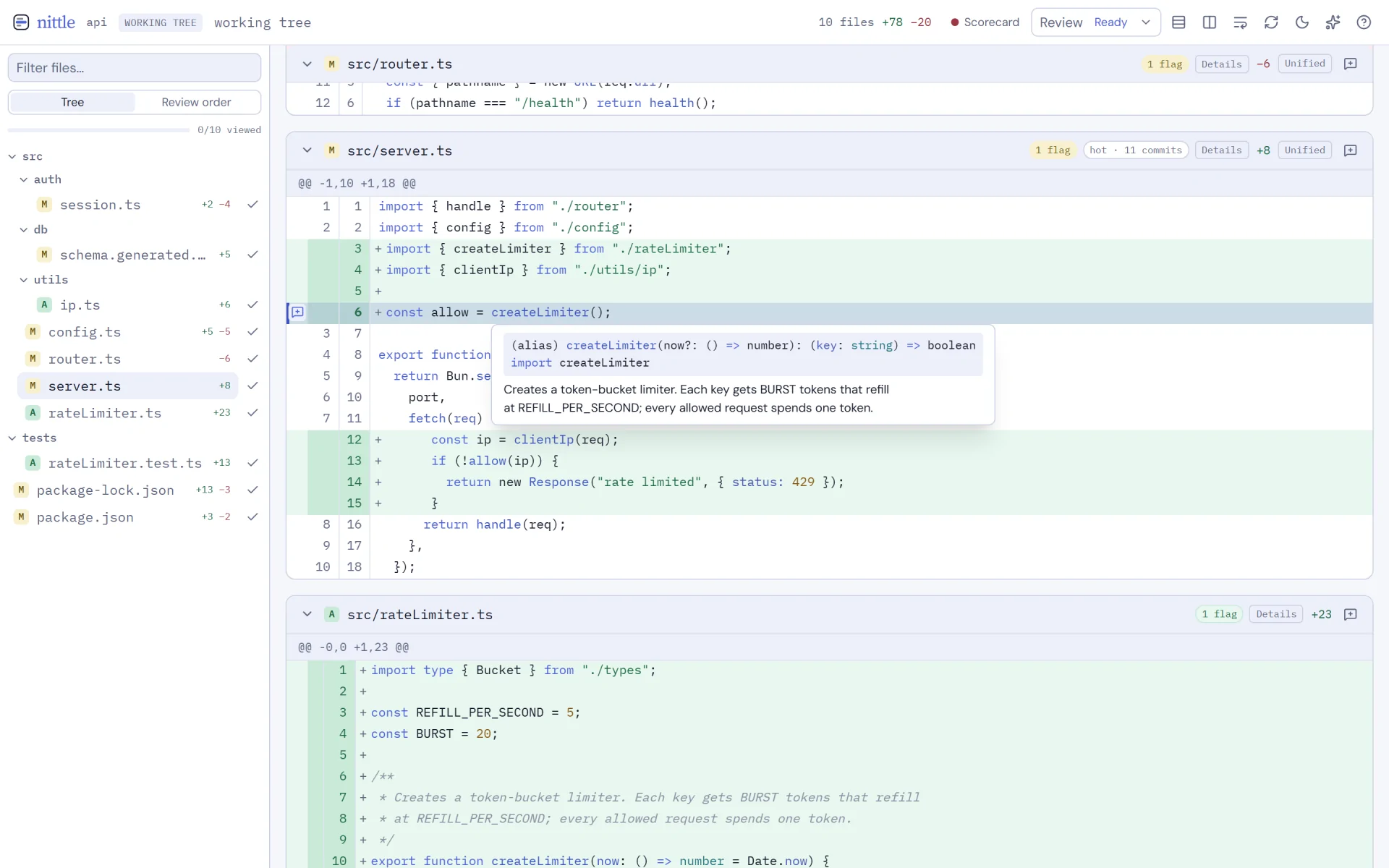
The reason it matters for agent code specifically: agents love to call a helper that already existed, or invent one that almost does. Before, checking meant leaving the review and opening an editor. Now gd on the call takes me there, in a read-only viewer, without losing my place. g/ searches every changed file at once.
The part I’m happiest about is the boring safety rule underneath it. nittle never runs language servers from the repo you’re reviewing, and the compiled binary stopped loading .env and bunfig.toml from the working directory. You’re reviewing code you didn’t write yet, so the reviewer shouldn’t execute any of it. The code navigation guide covers setup.
A vim keymap that’s actually vim
v0.29.0 and v0.31.0 made the whole review keyboard-first. Counts and chords work, so 10j moves ten lines and gd does what you’d expect. There’s a line cursor, visual ranges, / search with n and N, a Ctrl+p file picker, z folds, and comment keys like e, dd, yy and R.
The ? help is generated from the same key table the handlers use, so it can’t drift out of date. Keyboard review has the full map.
Knowing where to start
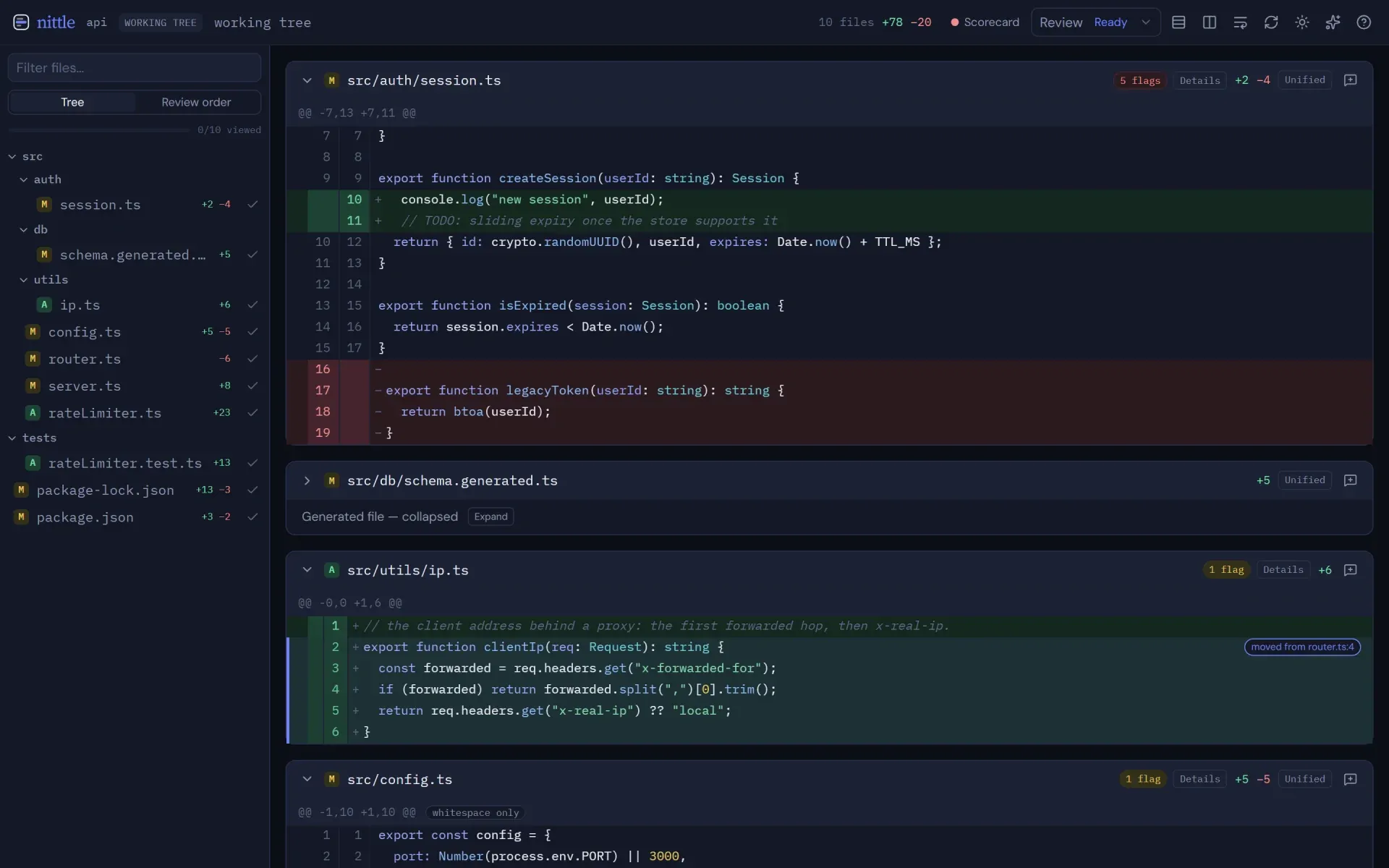
v0.28.0 was the scorecard release. It bands a change on size, tests, public API, dependencies and hotspots from fixed rules, with no model involved, so the same diff gets the same score every time. Agents can read it too, through a get_scorecard MCP tool.
The same release added review order (dependencies first, each source file right before its test), collapsed lockfiles and whitespace-only hunks, moved-code detection, and review rounds. Rounds give you a “since last review” diff, so round three of an agent loop shows you what changed since round two instead of the whole thing again.
Closing the loop with the agent
A few releases chipped away at the handoff. v0.24.0 added setup, which detects your coding agents and writes their MCP config, asking first. It covers nine agents now. v0.29.0 added --wait, which blocks until you send feedback and prints it on stdout, so any agent that can run a shell command can use nittle even without MCP. It also added nittle show <rev> for reviewing a single commit.
v0.30.0 added suggested changes. A comment can carry the exact replacement text, rendered as a diff, and the agent gets the original and suggested text as structured data. “Rename this” is ambiguous. A suggestion isn’t.
Another rename
v0.29.0 is also where diffle became nittle. Another project called diffle launched on Show HN, and search results and package names were a mess. So less than a month after loupe became diffle, diffle became nittle. Nit plus -le.
This time there’s no long-lived alias. The first run of any nittle command moves your old ~/.diffle or ~/.loupe data into ~/.nittle, along with the install dir, PATH, agent plugins, MCP configs and browser prefs. v0.32.1 cleaned up the edges after the GitHub repo slug changed.
Still on diffle?
Install nittle and run any command once. The migration guide covers what moves and how to retry.
The part nobody puts in a headline
By commit count, most of the month was hardening. The server binds to loopback only and checks the host header. Unsent comment drafts survive a reload. The UI notices when the server dies and recovers. The Windows installer moves a locked exe aside instead of refusing to update. Installers offer shell completions. npm, Homebrew and Scoop packages got staged. Comments go stale when the line they were on moves. Dependency advisories got bumped, a lot.
None of that makes a good screenshot. All of it is the difference between a tool I use and a tool I trust to have open all day.
Why it moved this fast
Fourteen releases in a month is a lot to ask of anyone on an older version, and the rename landed in the same release as the biggest feature drop. That’s the cost.
The speed came from working the way I wrote about here: give the agents the outcome, give them a judge that isn’t themselves, and review what they wrote before it merges. For nittle, that review happens in nittle.
It’s on GitHub, the releases page has every note, and the install is one line at nittle.dev.